
DiverInterCom • KCore Scuba Diving
The Dive Computer Your Underwater CPU
From your first depth and dive-time display to advanced decompression calculations, mixed gases and CCR operation — discover what your dive computer tells you and how it works.
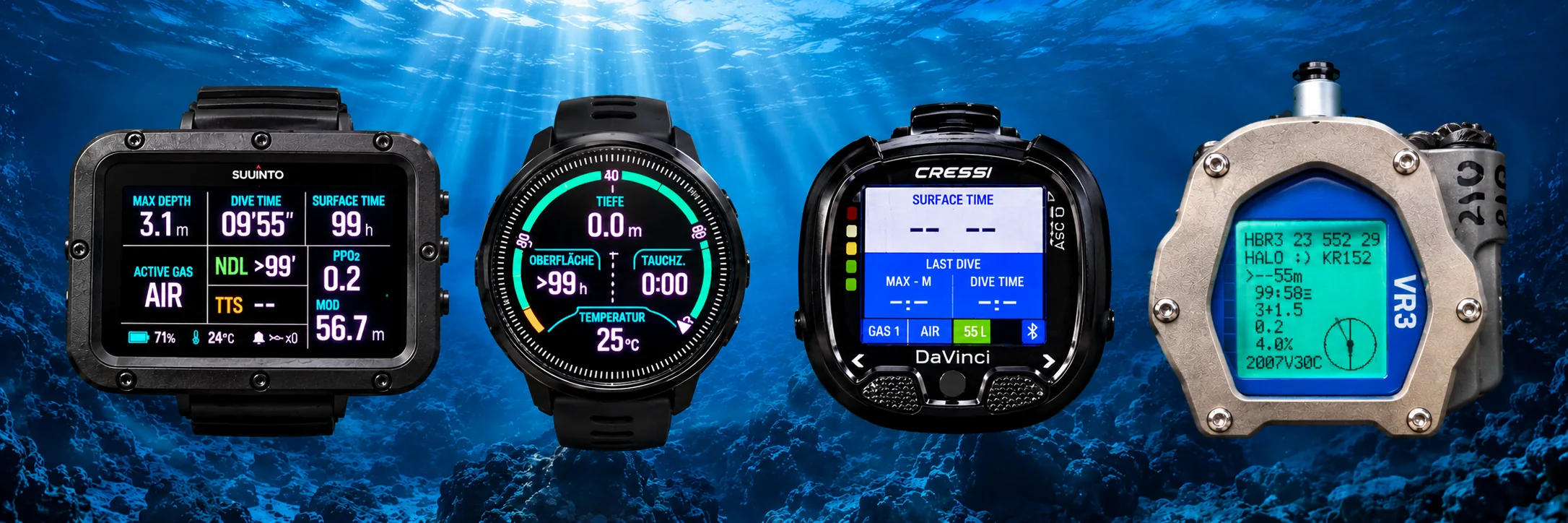
Dive Computer Education · From First Dive to Technical Diving
Understanding the Dive Computer
Part 1 — First Look · Part 2 — Advanced Understanding · Part 3 — Technical Dive Computers
First Look at Your Dive Computer
Depth, dive time, NDL and the essential information every diver should understand.
Part 1 · Beginner Introduction
First Look on Your Dive Computer
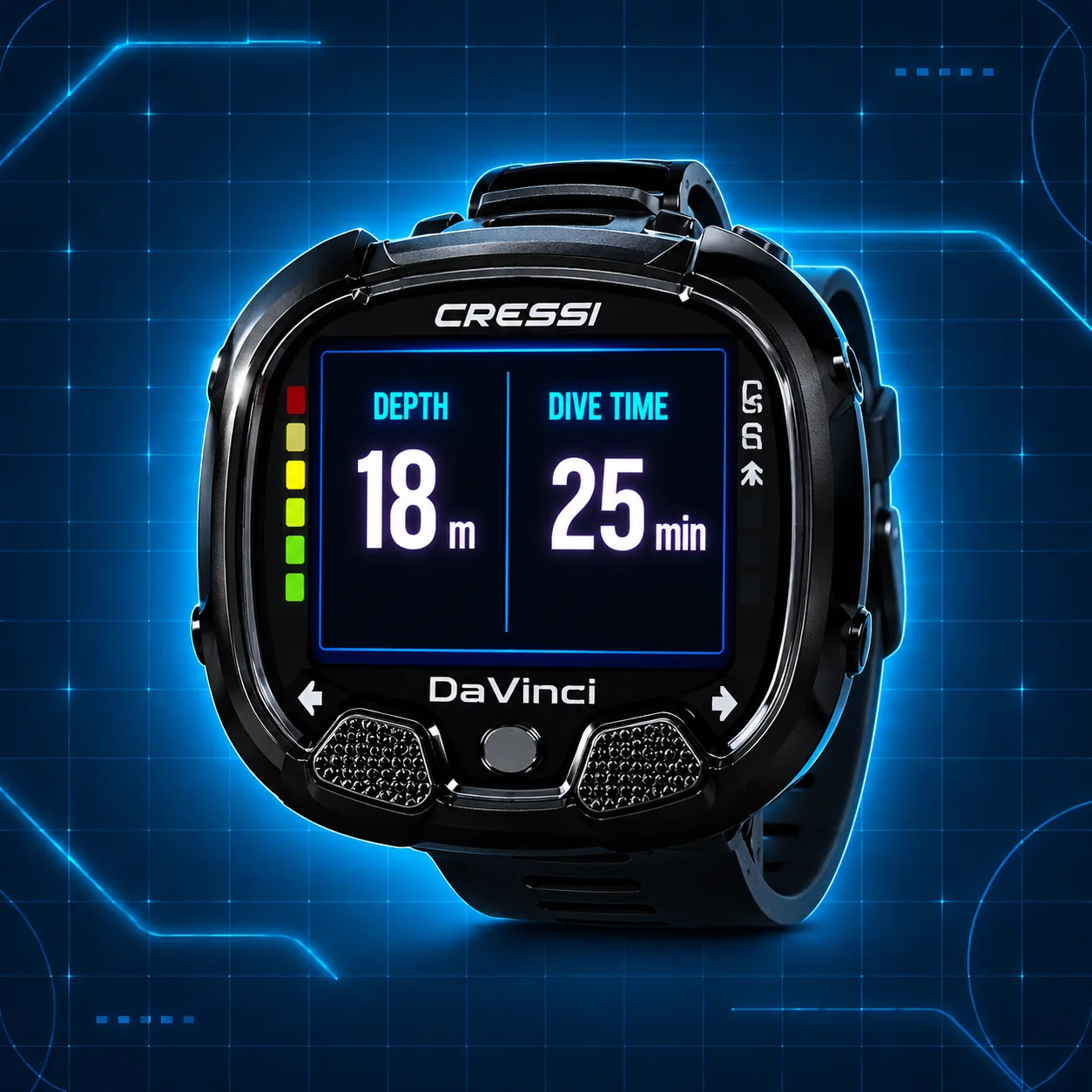
Start with the two most basic readings on a dive computer: your current depth and the time you have spent underwater.
In this illustrated example, the diver is at 18 metres and the dive time is 25 minutes.
Part 1 · First Look
What is a dive computer?
A dive computer is your underwater CPU, a small electronic instrument that worn on your wrist. But what is it actually good for?
Let us start really simple. A dive computer displays your depth and the time you have spent underwater. That is already its first and most important job. In earlier days, divers used a dive watch and a separate depth gauge, together with diving tables to plan how long they could stay underwater. Today, the dive computer combines these functions in one instrument and follows the dive as it happens.
Of course, modern dive computers can do much more, but you do not need to understand every number on the screen on your first day. Start with depth, time and one more important number: NDL.
What does NDL mean?
NDL stands for No Decompression Limit. A typical recreational dive computer is designed to calculate a dive using air as the breathing gas. It estimates how much longer you may stay at your present depth before mandatory decompression stops become necessary.
For example, if your computer shows NDL 20 min, it means that, according to its current calculation, you have about 20 minutes remaining at this depth before entering mandatory decompression. It does not mean that your tank contains 20 minutes of air. Those are two completely different things.
As you swim deeper or shallower, your NDL changes. At greater depths the available time becomes shorter. When you move into shallower water, the computer continuously updates its calculation. Staying within NDL reduces decompression obligations, but it does not guarantee that decompression sickness cannot occur.
What happens if the NDL runs out?
If you exceed the NDL, your dive becomes a decompression dive. Your computer will normally show the mandatory decompression information needed for the ascent, such as a ceiling, stop depth or stop time, depending on the model.
Why? During a dive, nitrogen from the breathing gas dissolves into the tissues of your body under pressure. The deeper you go and the longer you stay, the more important this nitrogen loading becomes. During ascent, the pressure decreases and the body needs time to release the excess nitrogen.
The computer estimates this process with a mathematical decompression model. It cannot measure the nitrogen directly inside your body. Mandatory decompression is not something to improvise on a recreational dive. Plan your dive within your training, gas supply and computer limits.
If you want to understand NDL, nitrogen loading and decompression in more detail, continue with our DiverInterCom Decompression Theory article.
How do I switch on my dive computer?
Most modern dive computers are quite simple to start. Some switch on automatically when they contact water; others enter dive mode when you descend below a certain depth, for example around 1 metre. Some models also have a button to switch them on or enter dive mode manually.
Before entering the water, check that your computer is working, the battery has sufficient charge, the correct breathing gas is selected and the settings are appropriate for your dive. Do not rely only on automatic activation without checking your instrument first.
Many current computers have a rechargeable battery, while others use a replaceable battery. The exact operation depends on the model, so take a little time to learn your own computer before the dive.
What else does it show?
Besides current depth, dive time and NDL, most recreational dive computers show additional useful information. Typical examples are maximum depth, water temperature, ascent rate, battery status, date and time, and sometimes a safety-stop countdown.
The ascent-rate indicator is particularly useful. It warns you if you are going up too fast. Many computers use audible signals, vibration or visible warnings for things such as a fast ascent, excessive depth, low battery or an NDL that is coming to an end. The available alarms and their settings depend on the model.
A safety stop, often made at about 5 metres for several minutes on a recreational dive, is different from a mandatory decompression stop. Your computer may display both, but they do not mean the same thing.
What happens when the dive is finished?
After you return to the surface, the computer leaves dive mode automatically after a short period. It stores the information about the dive in its dive log, so you can look at it later.
The log may show the date, dive time, maximum depth, temperature and a graph of your depth during the dive. Some computers can also transfer the dive to an app on your phone, allowing you to keep a digital dive log and add notes or pictures.
The computer also starts counting your surface interval. That is the time you have spent on the surface since the previous dive, and it is especially important when you plan another dive on the same day.
Why is the surface interval important?
Even after the dive has ended, there may still be excess nitrogen dissolved in your body. You continue to release that excess nitrogen while resting on the surface. The next dive therefore does not necessarily begin with the same nitrogen loading as your first dive.
The dive computer remembers your previous dive and takes its estimated remaining tissue nitrogen into account when calculating the NDL for the next dive. A longer surface interval allows more nitrogen to be released and can increase the available NDL on the next dive.
You may see residual-nitrogen or desaturation information lasting many hours, sometimes into the next day. The exact time depends on the dives and the computer model. Your body does not become free of nitrogen: nitrogen is naturally present in the tissues even when you have not been diving. What decreases is the extra nitrogen accumulated during the dive.
What does the little airplane symbol mean?
Most dive computers show a no-fly warning after diving. It reminds you that you should wait before flying or going to a significantly higher altitude, because the lower surrounding pressure can increase decompression sickness risk.
The no-fly indication is not necessarily identical to the computer’s estimated desaturation time. Follow the applicable flying-after-diving guidance and your computer’s instructions; a countdown is not a guarantee of zero risk.
Can my computer show how much air is left in the tank?
Some models can. This is called air integration. A compatible pressure transmitter is fitted to the first stage of the regulator, and the dive computer receives information about the pressure remaining in your scuba tank.
That means you can see your tank pressure directly on the computer screen, and some models can also estimate remaining gas time. Air integration is more common on higher-priced models, and the transmitter may need to be purchased separately.
If your computer does not have air integration, you still monitor your tank pressure with a separate pressure gauge. Remember that NDL and remaining breathing gas are not the same thing.
Can I use Nitrox instead of air?
Many dive computers also allow you to select a different breathing gas, such as Enriched Air Nitrox (EAN). Nitrox contains more oxygen and less nitrogen than ordinary air. At suitable depths, that can allow a longer NDL, but it also introduces an oxygen-related depth limit.
The computer needs to know the correct oxygen percentage of the gas you are actually breathing. For example, EAN32 contains 32% oxygen. Never leave the computer set to air when using a different gas and assume its calculations will still be correct.
Nitrox is a separate training subject. To learn more about its advantages and limits, read our DiverInterCom Nitrox articles.
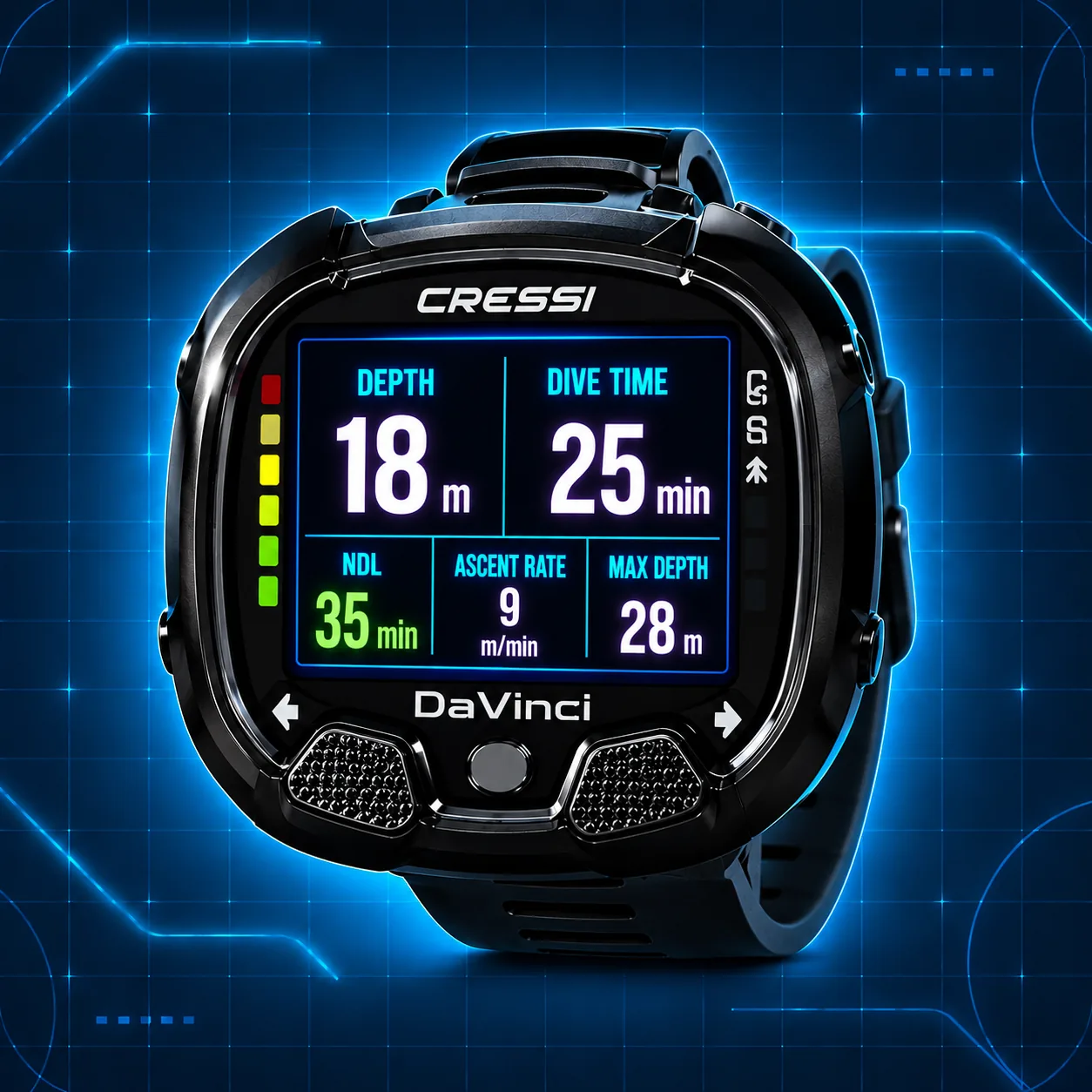
The dive computer shows you important information during the dive. It's your dashboard and your time and depth measuring instrument.
What about advanced dive computers?
More advanced computers offer settings menus, personal conservatism adjustments, an electronic compass, Bluetooth connectivity, phone apps and on selected models GPS positioning at the surface, dive-site locations and maps, including underwater depth contours or bathymetric maps. GPS reception does not work normally underwater, and map availability and display functions depend on the model. Some allow several breathing gases, including Nitrox mixtures used during a dive.
Technical dive computers go further. They can support multiple gas switches, Trimix, planned decompression and, on suitable models, closed-circuit rebreather (CCR) calculations. These are subjects for experienced and appropriately trained divers, and we will explore them in Part 3.
For now, remember the basic idea: your dive computer tells you how deep you are, how long you have been underwater, and what its calculations say about your remaining no-decompression time and ascent. It is a very useful instrument, but it does not replace planning, training or paying attention to your breathing gas and your buddy.
Examples of simple entry-level dive computers
A beginner scuba diver does not need an expensive technical dive computer. Here are three common examples that provide the important information for recreational diving, including depth, dive time and no-decompression limits.
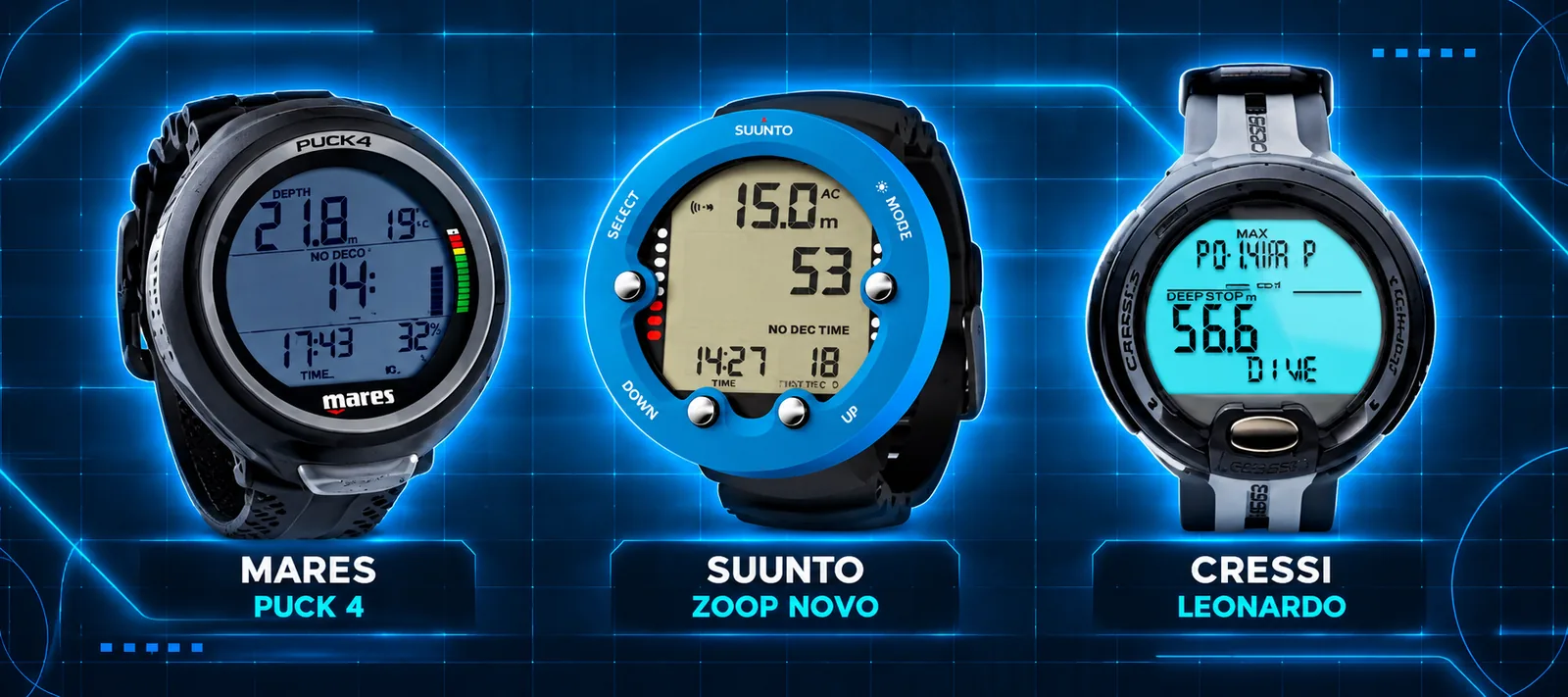
Cressi Leonardo
Approx. €150–220
A simple recreational dive computer with a clear display and easy one-button operation. It supports Air and Nitrox diving and provides the essential depth, time, NDL and ascent warnings.
Suunto Zoop Novo
Approx. €200–270
A robust dive computer with a large backlit display and four-button menu. It supports Air, Nitrox, Gauge and Freedive modes, with a built-in dive planner and dive log.
Mares Puck 4
Approx. €230–290
A compact, one-button dive computer with Air and Nitrox modes, a clear display and Bluetooth dive-log transfer to a phone. It also offers more advanced settings for later progression.
Prices are approximate European retail ranges and can vary by shop and availability. These are examples, not a ranking or buying recommendation.
PART 2 — ADVANCED UNDERSTANDING
The Dive Computer — Your Underwater CPU. From the first look at depth, time and NDL to the menus, calculations, gases, graphs and navigation functions of modern dive computers.
The next step: what can we actually do with the computer?
In Part 1 we looked at the basic idea. You wear your dive computer, you go underwater, and it tells you how deep you are, how long you have been there and how much no-decompression time is left. Simple. But when you take a closer look at the menu, you discover that this little instrument is doing much more than showing numbers. It has settings for your dive, your breathing gas, the way it calculates decompression, the warnings it gives you and the information it saves afterward.
We will start simple again. If this is your first dive computer, you should be able to follow. If you have been diving for years, we will move beyond the basic buttons quite quickly, because the interesting part is not only where a setting is located. The interesting part is what that setting changes in the calculation, on the screen and in the actual dive.
1. First explore the menu — before you enter the water
Different manufacturers use different names and button combinations, but the basic organization is similar. You may find Dive Mode, Dive Setup, Gas, Algorithm or Conservatism, Alarms, Display, Logbook, Compass, Connectivity and System. Some settings are available only at the surface. Some change with the selected dive mode. A few can be adjusted underwater, depending on the model.
A practical way to learn your computer is to begin at the surface screen and go through one menu at a time. Find where you select Air or Nitrox, where you check the battery, where you adjust your display and where the computer shows its algorithm settings. Do not start by changing everything. First find out what the computer is already configured to do.
Look especially at the selected dive mode, active gas, oxygen limit, conservatism, depth and ascent alarms, and whether the computer has carried over tissue loading from an earlier dive. Some models store separate settings for Single Gas, Multigas and other modes. The same computer can therefore behave differently simply because you selected another mode.
The main dive screen and the additional screens
The main screen is your dashboard: current depth, dive time and NDL, with ascent or decompression information when needed. On more advanced computers you can customize secondary fields or switch between pages showing maximum and average depth, temperature, current gas, tank pressure, compass, tissue loading, oxygen exposure, GF values or a dive profile. A beautiful display is useful only if you can read the essential information immediately.
An experienced diver may prefer a compact technical layout with several values visible at once. A beginner may prefer large depth, time and NDL numbers. Both approaches can be correct. The important question is: can you recognize the information you need, without searching through five screens while you are busy underwater?
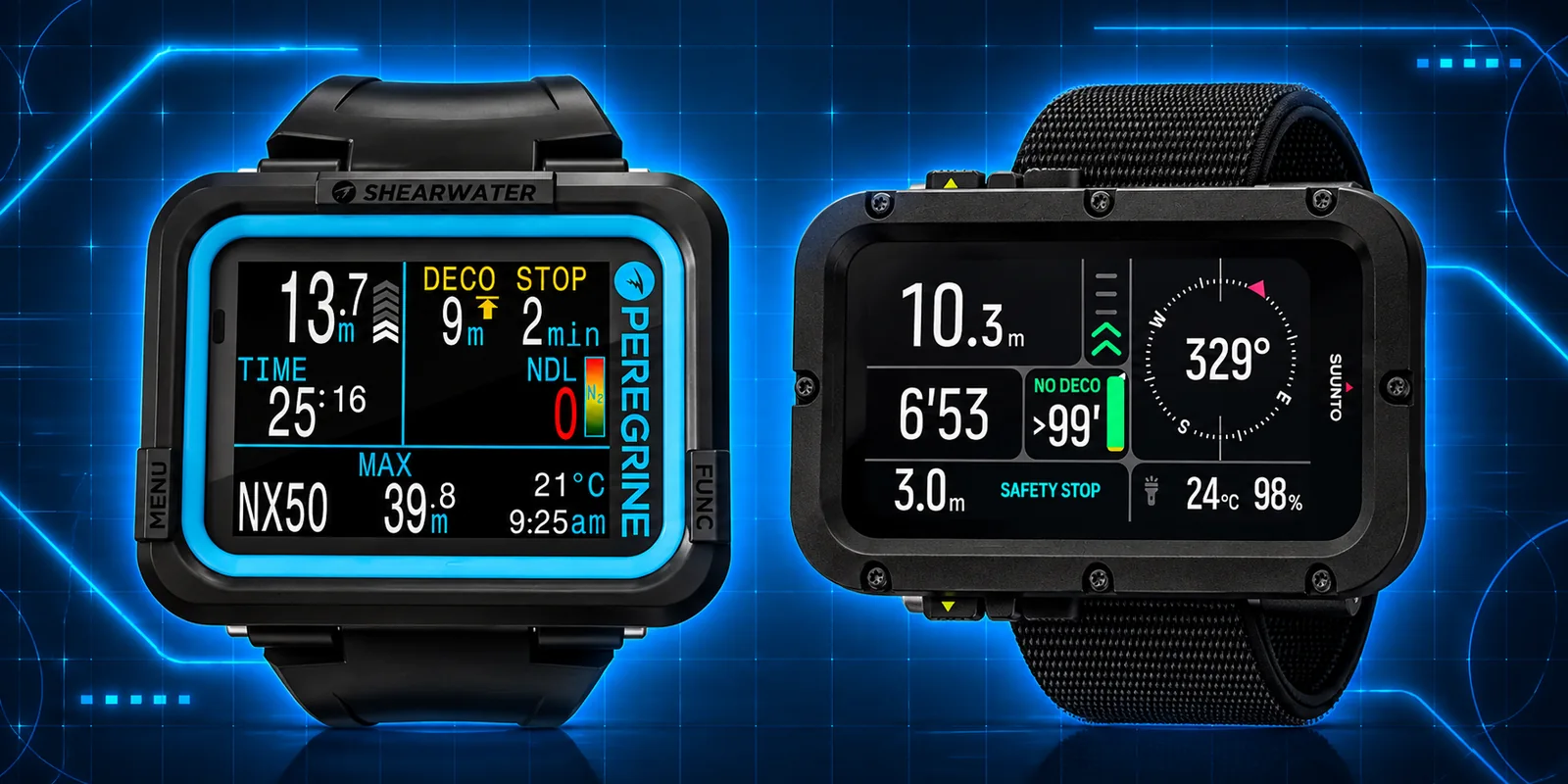
2. Conservatism — from a simple level to GF Low and GF High
You have probably seen settings called Safety Factor, Personal Adjustment or Conservatism. Some computers present them as a simple choice: 0, 1, 2 or perhaps 1, 2, 3. Cressi uses the SF terminology on supported models; other manufacturers use their own names. These numbers are not universal measurements. They are the manufacturer’s way of offering more or less conservative decompression calculations. Do not assume that “Level 2” on one brand means the same thing as “Level 2” on another.
What changes? The computer may shorten your available NDL, make decompression requirements more restrictive, or both, according to its algorithm. Choosing a higher safety factor is not the same as changing the gas in your cylinder, and it does not measure your actual physical condition. It changes the model’s permitted exposure.
Now open the advanced algorithm menu
On computers such as the Suunto Nautic and Shearwater models using Bühlmann ZHL-16C with Gradient Factors, you may find presets such as Low, Medium and High, followed by a Custom option. The names describe the degree of conservatism, not a low or high quality of the computer. The two numbers behind a preset are GF Low and GF High. For example, the Suunto Nautic lists Low 45/95, Medium 40/85 and High 35/75, with 40/85 as its documented default.
GF stands for Gradient Factor. To understand it, imagine that the decompression model calculates how much dissolved inert gas its theoretical tissue compartments can tolerate at a given ambient pressure. The original Bühlmann limit is often called the M-value. A GF reduces the permitted supersaturation relative to that limit. It is a way of adding a defined margin to the model; it is not a direct measurement of bubbles or of your blood.
GF Low primarily influences the deeper part of a calculated decompression ascent and the depth at which the first stop may appear. GF High influences the permitted gradient toward the shallow end of the ascent and the surface. A lower GF High generally gives a more conservative shallow-end limit. A lower GF Low can produce a deeper first stop in profiles requiring decompression; it is not automatically a better or safer choice in every profile.
For a simple example, compare 45/95, 40/85 and 35/75 in a planning tool at the same depth, time and gas. Watch what happens to the NDL, the first stop and the total time to surface. This is much more informative than memorizing that a smaller number means “safer.” The outcome depends on the profile, and the effect of GF Low is not identical to the effect of GF High.
A word of caution here: there is no magic pair of GF numbers that makes every dive safe. Different divers, exposures, workloads and thermal conditions carry different risks. A model cannot see your individual physiology. Custom GF settings belong to informed planning and consistent practice, not to experimenting underwater because a longer NDL looks attractive.
Why two computers may show different NDLs
Put two computers next to each other at the same depth. They may disagree even when both are functioning correctly. They may use different algorithms, different conservatism settings, different depth histories, different surface intervals or different treatment of previous dives. Some calculate and round the displayed number differently. A difference in NDL does not by itself prove one computer is wrong. Compare the complete settings and dive histories before you compare the numbers.
3. Nitrox — one gas, but several important settings
In Part 1 we introduced Nitrox: air enriched with oxygen, often EAN32 or EAN36. Now we open the Gas menu and look at what the computer needs to know. The most important entry is the oxygen fraction, usually shown as O₂% or FO₂. Air is about 21% oxygen; EAN32 is 32%. The computer uses the selected mixture to calculate nitrogen loading and oxygen exposure.
A second setting is the oxygen partial-pressure limit, ppO₂, used to calculate the Maximum Operating Depth (MOD). More oxygen can give you more NDL at suitable depths, but it also places a depth limit on that mixture. For example, EAN32 at a ppO₂ limit of 1.4 bar has an approximate seawater MOD of 33.8 m. At 1.6 bar the theoretical MOD is about 40 m; that is not an instruction to use 1.6 as a routine working limit. Your training, dive plan and operating procedures determine the appropriate limit.
The computer does not know what gas is actually in your cylinder just because you selected EAN32 on the screen. The gas must be analyzed, identified and matched to the computer setting. The same is true when you change cylinders or dive another day. The wrong oxygen percentage can produce misleading NDL, MOD and oxygen-exposure information.
CNS, OTU and oxygen exposure
Mid-level and advanced computers may show CNS oxygen exposure as a percentage and sometimes OTU values. These are exposure estimates based on time and ppO₂, not sensors measuring oxygen injury in your body. CNS and OTU calculations are especially useful as dives become longer, involve higher oxygen fractions or include repetitive exposure. Part 3 will go deeper into their application during decompression and mixed-gas dives.
4. Single Gas, Multigas and the beginning of extended-range diving
A Single Gas mode is exactly what it sounds like: the computer calculates the dive using one active breathing mixture. That can be Air or Nitrox. Multigas mode introduces a new idea: you can configure several mixtures because the dive plan may use one gas at depth and another gas during the ascent. This is common in extended-range and decompression diving.
You may see a gas list containing Air, EAN32, EAN50 or oxygen-rich decompression gas. Some advanced computers also accept helium, which brings us toward Trimix. The list is not a shopping list of all gases you own. It is a statement of what you intend to use on that particular dive.
This detail is important: on models that include enabled future gases in their time-to-surface prediction, a computer may calculate a shorter ascent based on a gas switch that has not yet happened. If you do not actually carry the gas, the prediction can be unrealistic. On the Suunto Nautic, for example, the manufacturer explicitly instructs divers to disable gases they are not carrying. The computer’s prediction is only as useful as the plan entered into it.
For now, understand the difference between an active gas, an enabled future gas and a disabled gas. We will return to the actual gas switch at the end of this part. The procedures, verification and decompression consequences belong to trained multigas diving and lead directly into Part 3.
5. The dive profile — a picture of the dive, not just a maximum depth
A dive is not only “30 metres for 40 minutes.” You may descend to 30 m, spend time around 25 m, explore a reef at 18 m and finish in shallow water. The computer follows the changing pressure through the dive and calculates its model accordingly. That is why multilevel diving is so important to understanding a modern computer.
Open the dive profile after a dive. The graph shows depth against time. You can see the descent, the deepest section, the time spent shallower, the ascent and the stops. Depending on the computer and app, you may also see temperature, tank pressure, ascent-rate warnings, gas changes, deco events and other markers. The maximum depth tells you only one point. The profile tells you the story.
The advanced logbook becomes especially useful when comparing a plan with what you actually did. Did you stay deeper than intended? Did the ascent contain a fast segment? How long was the surface interval before the next dive? Did a gas change happen when planned? A good dive log is a learning instrument, not only a collection of souvenirs.
6. Sample rate — three different clocks inside the computer
Here is a detail that is often misunderstood, including by experienced divers. When a manufacturer says “10-second sampling,” what exactly is sampled? There are at least three different things to distinguish: the pressure/depth sensor readings, the internal decompression-model updates and the samples stored in the dive log. They do not have to use the same interval.
A. Pressure and depth measurement
The pressure sensor measures ambient pressure, which the computer converts into depth using its calibration and water-density assumptions. It must react sufficiently quickly for the depth and ascent-rate display to be useful. Manufacturers do not always publish the raw sensor polling frequency. We should not invent one from the logbook settings.
B. Tissue-model calculation
The decompression software uses the diver’s depth, time and breathing gas to update estimated inert-gas loading in its mathematical tissue compartments. It must account for changes in depth throughout the dive. The internal integration or update interval is an implementation detail and is not necessarily identical to either sensor polling or saved log samples. A computer can update its calculations more often than it writes a point into the log.
C. Stored dive-log sample interval
This is the interval you are most likely to find in the user menu. If a log stores one depth point every 10 seconds, the displayed graph contains six stored points per minute. A 2-second log stores thirty. A shorter log interval can show brief depth changes more clearly, but consumes more memory. It does not automatically mean the decompression algorithm itself is five times more accurate.
This distinction matters when you examine short multilevel excursions. A ten-second graph may smooth or omit a brief peak that the computer nevertheless detected and used in its calculations. Conversely, a beautifully detailed log is not proof of the quality of the decompression model. Always distinguish recorded history from calculated history.
7. Tissue graphs — looking inside the decompression model
A tissue graph may look complicated at first, with several bars or lines. It becomes easier once you know what the graph represents. Bühlmann ZHL-16C, for example, works with sixteen mathematical compartments that respond at different rates to changes in inert-gas pressure. These are not sixteen identified organs with sensors inside your body. They are compartments in a model.
Fast compartments react relatively quickly when you descend or ascend; slow compartments respond over longer periods. During a dive, different compartments can become the limiting or “leading” compartment. The graph lets you see how the model distributes loading, and sometimes how close the leading compartment is to a chosen limit. It does not show real bubbles or diagnose decompression sickness.
Look at the tissue display after a dive and again after a surface interval. You will see the model changing as excess inert gas is released. A second dive begins with whatever residual loading the model still carries. That is why clearing tissue data or resetting a computer to make its NDL longer is not an innocent menu adjustment.
GF99, Surface GF and the next step
Some technical-oriented computers add GF99 and Surface GF. GF99 describes the present leading-compartment gradient as a percentage of the Bühlmann M-value gradient, while Surface GF estimates the gradient that would result if you surfaced immediately from the current tissue state. These are powerful interpretation tools, but not permission to ignore a ceiling or to substitute a single number for a decompression plan. We introduce them here because they make the tissue graph more meaningful; Part 3 will examine them in detail.
8. Air integration — pressure, consumption and remaining gas time
With a compatible transmitter attached to the regulator first stage, a computer can receive cylinder pressure wirelessly. Some systems can track more than one cylinder. A model may also estimate gas time remaining from pressure, cylinder size, consumption history and its own assumptions. This is a different calculation from NDL. One tells you about breathing-gas supply; the other tells you about the decompression model.
A gas-time estimate changes when your breathing changes. Current, average and predicted consumption are not the same thing. Check the tank volume setting, the transmitter pairing, battery condition and the meaning of the displayed reserve. Air integration can be very convenient, but its estimates do not replace a properly understood gas plan and a reliable means of monitoring pressure.
9. Alarms, ascent rate and the meaning of a warning
Modern computers can warn you about depth, dive time, ascent speed, low NDL, entering decompression, a missed ceiling, oxygen partial pressure, low battery and low cylinder pressure where air integration is fitted. Many let you customize some of these warnings. Some also provide vibration, which is useful when the computer is difficult to hear underwater.
An ascent-rate bar is based on change in depth over time. Short movements of your arm and the filtering used by the device can affect what you see, so learn how your own computer displays a warning. A safety-stop countdown is not the same thing as a mandatory decompression stop. An alarm should make you check what is happening, not simply press a button until it disappears.
Be careful with options called Silent Mode, Alarm Off, Deco Lockout or Reset Tissue Loading. These may have operational consequences beyond reducing noise or clearing a screen. Read the model-specific manual before changing them.
10. Bluetooth, phone apps and firmware updates
After the dive, Bluetooth can connect the computer to a phone or tablet. Depending on the model, the app can import logs, show detailed profiles, attach locations, store notes and photos, share dives or manage device settings. A desktop application may offer deeper analysis and export formats. The computer remains the instrument used underwater; the phone is mainly a companion for setup, transfer and review.
Firmware updates can improve features, compatibility and correct software problems. But an update is not something to do casually immediately before entering the water. Read the release notes, charge the battery, complete the update at the surface and check the settings afterward. On some devices, updating firmware can reset tissue loading. Shearwater explicitly warns about this on its Peregrine TX support page. That matters when planning repetitive dives.
Bluetooth is a short-range radio link, not a general underwater communications system. The familiar sync workflow takes place at the surface. Some systems use other specialized links for tank pressure or diver communications; do not confuse those with ordinary Bluetooth phone synchronization.
11. GPS, compass and maps — what can the computer actually navigate?
An electronic compass can help with underwater headings and reciprocal courses. It may show degrees, bearing markers or a heading lock. It needs correct calibration and can be affected by nearby metal and magnetic interference. The compass tells you direction; it does not tell you where you are on a reef.
GPS adds location, but there is a catch: ordinary satellite GPS signals do not work through seawater at diving depth. A dive computer may record the entry and exit positions while it is at the surface. Some models can display maps on the device, including coastlines or selected dive-site information; others show mapped positions only afterward in a phone app. A map, a bathymetric contour chart and a live underwater position are three different capabilities.
For example, Garmin’s Descent X50i can show dive entry and exit points in its log map when GPS was acquired. Suunto Nautic can estimate a dive route using a combination of sensors and then synchronize the result to the Suunto app, but Suunto states that the route is not displayed on the computer itself. Such a reconstructed route is not equivalent to continuous underwater GPS positioning, and its reliability can suffer in overhead environments or with poor starting GPS.
Bathymetric maps can be especially interesting for planning a shore dive, identifying slopes and drop-offs, or understanding the general shape of the seabed. But their coverage, detail, licensing and availability vary by device and region. Do not mistake a coarse chart contour for an exact navigable wall or a guarantee of safe access. The old-fashioned compass, the dive plan and actual observations underwater still matter.
12. The last step in Part 2 — the gas switch
We have now reached the point where a mid-level dive computer begins to behave like a technical planning instrument. Imagine a dive made on a bottom gas, with another oxygen-rich gas reserved for the ascent. Before the dive, the mixtures are entered into the gas list. During the ascent, a compatible multigas computer can indicate when a different gas becomes usable according to its configured MOD and the plan.
But the computer cannot turn a valve, identify the cylinder in your hand or verify what you are breathing. A gas-switch prompt is information, not confirmation. The diver must positively identify the correct cylinder and gas, verify the planned depth and oxygen limit, follow the appropriate switching procedure and then confirm the actual change on the computer. Only after the gas is truly changed should the active gas in the computer represent the new mixture.
There is a second important point. If a predicted ascent assumes a decompression gas and that gas becomes unavailable, the displayed TTS and decompression schedule can change substantially. This is why multigas planning also involves contingency gas and realistic bailout calculations. That is where our next article begins.
13. Batteries and charging — do not run out of your underwater CPU
A dive computer may have a built-in rechargeable battery, a user-replaceable battery, or a battery that should be replaced by an authorized service center. A rechargeable computer is convenient: connect its charging cable or dock between dives. A replaceable-battery model can be practical on a remote trip, but only if the correct battery, sealing parts and replacement procedure are available. Never assume that a battery change is just like changing one in a household watch. The water seal matters.
How long will the battery last?
There is no single answer for all dive computers. Some are designed for many dives on a charge; others trade battery life for a brighter display, GPS, wireless tank-pressure monitoring and more functions. As a concrete example, Garmin specifies up to 13 hours for the Descent X50i with high display brightness, up to 16 hours at medium brightness and up to 20 hours in Night Dive mode. These are manufacturer figures, not guaranteed runtimes. Water temperature, battery age, brightness, sensors and the way you use the device can change the result.
For your own model, read the manufacturer’s stated dive-mode runtime rather than its general smartwatch or standby figure. Also learn whether the display warns at a specific remaining percentage, whether dive mode becomes unavailable at low charge, and whether a critically low battery can switch the computer off.
Between dives and on a liveaboard
Before a day of diving, check the charge while still on the boat or at the dive center, not after you have put on the equipment. For a liveaboard with several dives each day, establish a charging routine: rinse and dry the computer, inspect the charging contacts, connect the correct cable in a dry place and confirm that charging has actually started. Carry the proper cable and a backup charging option suitable for the trip. Do not rely on finding a compatible charger on a remote boat.
Charging contacts should be clean and completely dry before connecting power. Garmin specifically warns that moisture on contacts can cause corrosion, and that a wet Descent X30 or X50i may switch on in storage and drain its battery. A computer kept in a damp equipment bag is not necessarily resting. Follow the manufacturer’s charging instructions, and avoid excessive heat or charging a wet device.
If the battery is lower than expected before the next dive, charge it and verify the level before entering the water. If it cannot provide a reliable margin for the planned dive and possible delays, do not begin that dive with it. On an extended trip, a second properly configured computer can provide genuine redundancy, provided it has followed your complete dive history.
What happens to the previous dives and the nitrogen loading?
Two kinds of memory must be distinguished. The logbook may retain records of previous dives, while the decompression calculation also needs its current tissue loading, surface interval and sometimes oxygen-exposure state. Those are not interchangeable. A stored depth graph does not prove that the computer can safely continue a repetitive-dive calculation after a complete power failure.
Some models preserve settings and dive records in nonvolatile memory but lose the active tissue state after the battery has died or been disconnected. Shearwater documents this explicitly for the Peregrine: settings survive a dead battery, but tissue loading is lost if the battery dies between repetitive dives. Other computers may preserve more state or handle battery replacement differently. Check the exact model manual rather than assuming that every computer behaves alike. After any battery failure, replacement, reset or firmware change, verify what the device still knows before considering another dive.
What if the computer dies underwater?
If your computer fails during a dive, you have lost its live depth, time and decompression guidance. Do not simply continue the dive because your buddy still has a working display. Stop the planned underwater activity, inform your buddy, and follow the failure procedure appropriate to your training and the dive plan. For a recreational no-decompression dive, that means making a controlled ascent using the available independent depth and time information and the agreed procedures. If you cannot reliably establish your exposure or obligations, treat the situation as uncertain rather than inventing a remaining NDL.
For a planned decompression dive, the situation is more serious. The ascent must be managed using a suitable independent backup computer that has tracked your full exposure, or the preplanned contingency schedule and instruments for that dive. A generic recreational ascent rule cannot replace an unknown mandatory decompression obligation. This is why technical divers plan instrument failures before entering the water.
Why not just use your buddy’s dive computer?
Because your buddy’s computer has been calculating your buddy’s dive, not yours. Even when you entered the water together, you may have spent different amounts of time at different depths, used different gases or completed different dives earlier in the day. The computer also carries its own settings, conservatism and tissue history. Your buddy’s NDL or decompression ceiling is therefore not automatically yours. It can provide useful situational information, but it cannot be treated as a replacement for your missing decompression record. Suunto explicitly warns against sharing a dive computer between users during a dive or a series of repetitive dives.
The practical lesson is simple: a battery indicator is part of the pre-dive check, and a backup is only a real backup if it has tracked the relevant dives and is configured for the gases and algorithm plan. Your underwater CPU is valuable — but it still needs power, and it cannot borrow somebody else’s nitrogen history.
14. Before your next dive — know what your settings really mean
A modern dive computer is not only a depth gauge with a clever display. It is a pressure-measuring instrument, a decompression-model calculator, a gas-configuration tool, a warning system and a detailed record of your dive. Its value comes from understanding which numbers are measured, which are calculated, which are predictions and which are simply settings that you entered yourself.
For the beginner, the next practical goal is to find the correct menus and understand the selected mode, gas, NDL, alarms and logbook. For the experienced diver, the interesting questions are deeper: Which algorithm is active? Which GF values are selected? Which gases are included in the prediction? How are the tissue and oxygen-exposure values displayed? What exactly does the computer record, and what does it merely estimate?
Examples of mid range-level dive computers
Suitable for most divers, from advanced recreational diving to light technical diving and dive professionals, these computers support multigas diving but offer different features for decompression, navigation and tank-pressure monitoring.
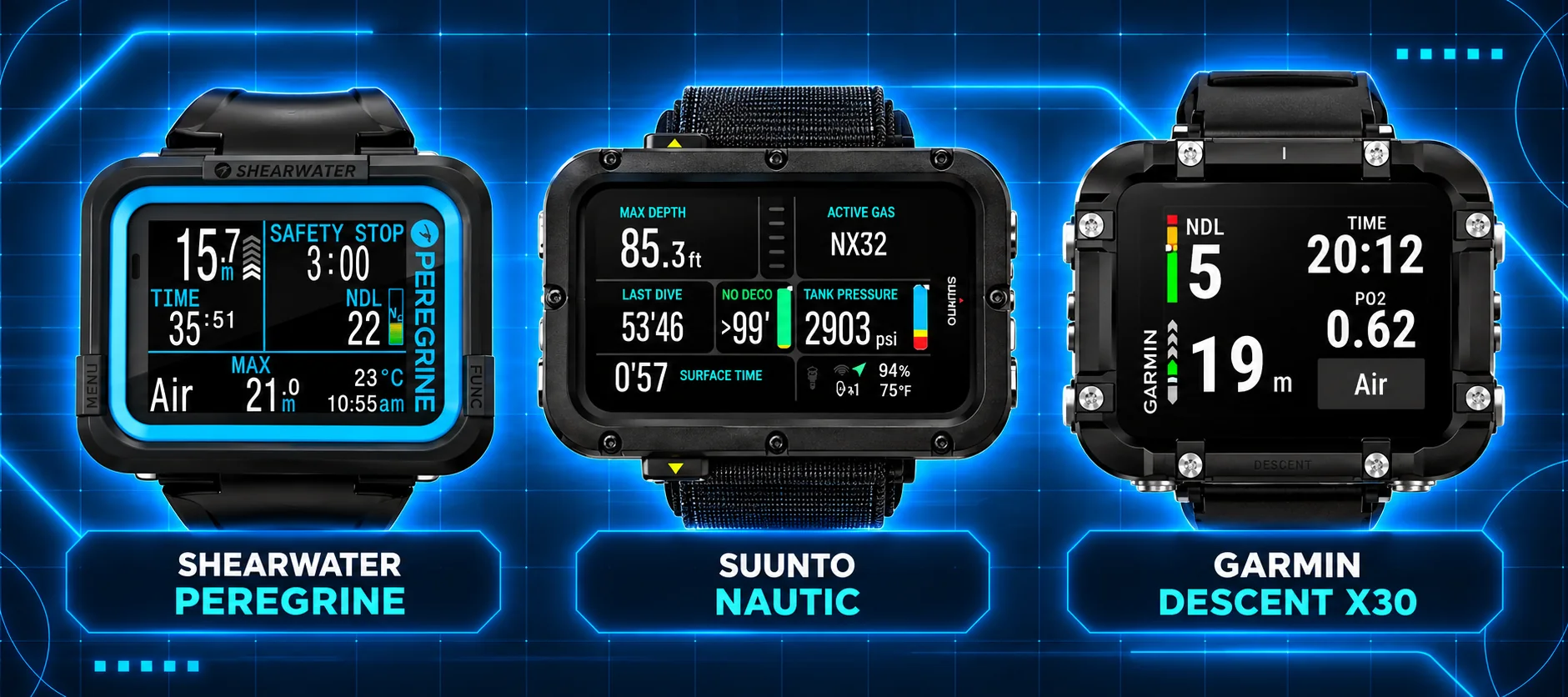
Shearwater Peregrine
Approx. €550–650
A clear colour-display computer with two-button operation, adjustable Gradient Factors and up to three Nitrox gases for recreational and decompression diving. Transmitter: No on the standard Peregrine; the separate Peregrine TX supports wireless transmitters. Built-in GPS: No.
Suunto Nautic
Approx. €700
A large-display computer supporting Air, Nitrox, Trimix and CCR, with adjustable Gradient Factors, digital compass and dive planning. Transmitter: Yes, compatible with Suunto Tank POD. Built-in GPS: Yes, for surface positioning.
Garmin Descent X30
Approx. €550–650
A colour-display computer supporting Air, Nitrox and Trimix, with adjustable Gradient Factors, digital compass and dive planning for open-circuit diving. Transmitter: No wireless air integration. Built-in GPS: Yes, for surface positioning.
Prices are approximate European retail indications and may vary by shop and availability. These examples illustrate different features, not a ranking.
In Part 3 — Technical Dive Computers, we will take these questions further: Bühlmann compartments and M-values, GF99 and Surface GF, decompression ceilings, time to surface, Trimix and helium, staged decompression, multigas contingencies, CCR setpoints and bailout. The aim is not to memorize menus. It is to understand what the underwater CPU is telling you — and what it cannot know.
Technical Dive Computers
Decompression management, Trimix, CCR, bailout and advanced technical functions.
What does a high-end technical dive computer actually add?
A basic dive computer tells you your depth, dive time and no-decompression limit. A technical computer goes further: it can track several breathing gases, calculate mandatory decompression stops, display the predicted time needed to reach the surface, and adapt its calculations when a diver changes gas. Some models support helium-based Trimix and closed-circuit rebreather (CCR) operation, including planned oxygen setpoints and open-circuit bailout.
Think of it as a continuously updating decompression instrument, not an autopilot. It knows the depth and time it measures, the gases and settings you enter, and sometimes cylinder pressures from transmitters. It does not know whether you have actually switched regulators, whether your gas analysis was correct, or whether the oxygen in a rebreather loop matches its programmed assumption.
Examples of high-end technical dive computers
Three advanced technical dive computers with different strengths in decompression management, mixed-gas diving, navigation and connectivity.
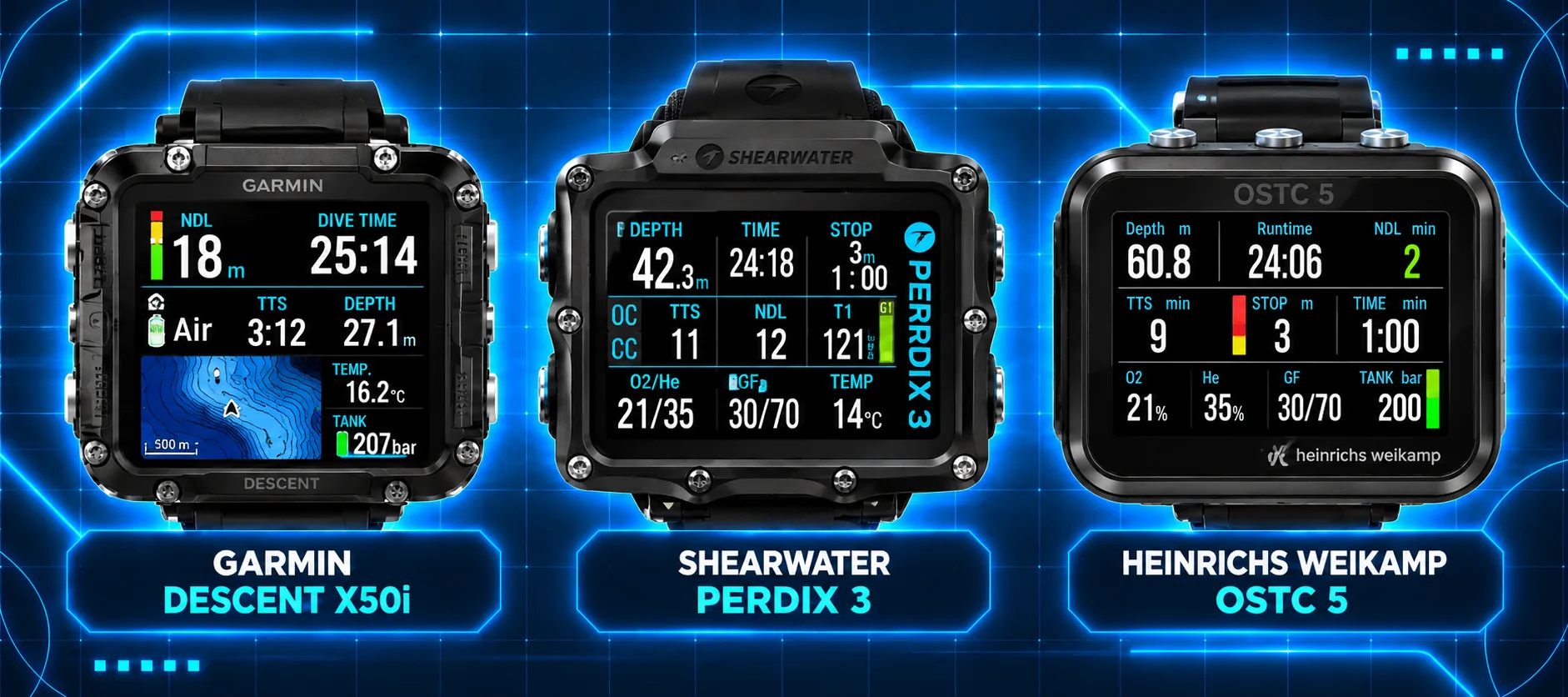
Garmin Descent X50i
Approx. €1,400–1,600
A large 3-inch colour touchscreen technical dive computer supporting Air, Nitrox, Trimix and CCR, with adjustable Gradient Factors, DiveView bathymetric maps, digital compass and SubWave diver communication. Transmitter: Yes, compatible with Garmin Descent T2. Built-in GPS: Yes, for surface positioning.
Shearwater Perdix 3
Approx. €1,395
A rugged technical dive computer with a 2.4-inch AMOLED display, supporting Air, Nitrox, Trimix and CCR, adjustable Gradient Factors, multiple gas switching and advanced decompression information. Transmitter: Yes, supports up to four wireless transmitters. Built-in GPS: No.
heinrichs weikamp OSTC 5
Price: To be verified
A German-made technical dive computer with a colour display, supporting mixed-gas diving, Trimix, CCR and adjustable Gradient Factors, with detailed decompression information and configurable technical diving functions. Transmitter: Availability to be verified. Built-in GPS: No.
Prices are approximate European retail indications and may vary by shop and availability. These examples illustrate different features, not a ranking.
1. The numbers that matter once decompression is mandatory
A technical display is useful only if the diver can distinguish a measured value from a calculated one and a prediction. Depth, elapsed time and ambient pressure are measured; tissue loading, ceiling, TTS and remaining gas time are modeled or estimated. Even a perfectly functioning sensor does not turn the decompression prediction into a physiological measurement.
Ceiling, stop depth and TTS are not interchangeable
The ceiling is the shallowest permitted depth under the computer’s current decompression model and settings. A displayed stop depth may be a rounded step in a staged schedule, often at fixed depth intervals; a raw or continuous ceiling can lie between those steps. TTS (time to surface) includes an assumed ascent, gas changes and required stops. It is conditional on the profile and gases assumed by the device.
Example: a computer may show a 9 m stop and 24 minutes TTS. That does not mean the diver will surface in 24 minutes regardless of events. Remaining longer at depth, ascending more slowly, losing a deco gas or changing the active gas can increase TTS. The difference between an updated prediction and a broken plan is the diver’s ability to recognize the cause.
The prediction hidden inside the prediction
Many technical computers offer TTS @ +5 or Δ +5: what the surface time would become after five more minutes at the present depth. This is a practical way to see how rapidly the decompression obligation is changing. A positive Δ +5 indicates that the projected obligation is growing; it is not a substitute for checking whether enough gas remains to complete that obligation. Garmin’s X50i and Shearwater’s technical displays document these fields.
2. Bühlmann tissue compartments, M-values and Gradient Factors
Bühlmann ZHL-16C represents inert-gas uptake and release using 16 theoretical tissue compartments with different half-times. These are mathematical compartments, not 16 anatomical organs. Nitrogen and helium are tracked according to the chosen gas and exposure history. The controlling or leading compartment can change during ascent; a single fixed “slowest tissue” does not govern the entire dive.
An M-value is a model limit on permitted inert-gas supersaturation at a given ambient pressure. Gradient Factors (GF) scale the permitted supersaturation below that theoretical limit. GF Low influences the deeper part of a decompression ascent and the initial stop; GF High sets the permitted gradient near surfacing. The pair describes an ascent strategy, not an individual probability of decompression sickness.
Two computers using ZHL-16C can disagree without either being defective: their GF settings, gas lists, treatment of planned gas changes, ascent rates, stop rounding, altitude/surface pressure and residual tissue histories may differ. Matching only the algorithm name is insufficient when comparing their plans.
GF99 and Surface GF: two different questions
GF99 reports the present leading-compartment gradient relative to the unmodified Bühlmann M-value gradient. Surface GF (SurGF) projects what that gradient would be if the diver surfaced immediately from the present tissue state. The first describes the current pressure environment; the second is a hypothetical immediate-surfacing calculation. Neither is a direct bubble measurement, and neither can independently authorize skipping a stop.
A diver at depth can have a moderate GF99 but a very high Surface GF. This is not contradictory: the ambient pressure at depth still suppresses supersaturation. These fields become most useful when interpreted together with the ceiling, current gas, GF settings and TTS—not as isolated percentages.
Why deeper is not automatically more conservative
A very low GF Low can drive earlier and deeper stops. That may slow the reduction of inert-gas pressure in faster compartments while some intermediate and slower compartments continue taking up inert gas. “More stops” and “deeper stops” are not automatically equivalent to lower overall decompression stress. DAN and CMAS both emphasize understanding the model and the effect of GF choices rather than treating one pair as universally best.
Changing Gradient Factors during the dive
Some technical dive computers permit selected decompression settings to be changed while underwater. This is model- and firmware-dependent, and the permitted controls are not necessarily the same as those available before the dive. For example, Shearwater’s Perdix 2 technical manual explicitly permits editing GF High during a dive, but not GF Low. The purpose is to adjust surfacing conservatism without resetting the accumulated tissue history.
Changing GF High from 85 to 75, for example, generally increases the modeled shallow-water decompression obligation. The computer recalculates ceilings, stop times and TTS from the existing tissue state using the revised limits. Raising GF High may reduce the calculated obligation, but does not reverse the actual inert-gas exposure or establish that a faster ascent is physiologically safe.
GF Low and GF High are selected model limits; GF99 is a live calculated indicator of the controlling tissue compartment’s present supersaturation relative to its unmodified M-value gradient. Surface GF estimates that indicator at surface pressure if the diver surfaced immediately. Neither GF99 nor Surface GF is a user-selected conservatism setting.
Other settings—such as active gas, available decompression gases, CCR setpoints and display fields—may also be adjustable during a dive, subject to the device’s operating mode. Divers should verify the exact underwater controls in the manual for their own firmware version; a pre-dive settings menu alone does not establish underwater editability.
3. Trimix changes more than the oxygen percentage
With Trimix, the computer must track both nitrogen and helium fractions. Helium changes inert-gas uptake and elimination calculations; it also affects gas density and breathing characteristics. The entered mixture must match the analyzed cylinder. A mislabeled or wrongly entered gas makes an otherwise precise decompression calculation precise about the wrong exposure.
MOD is primarily an oxygen partial-pressure boundary for a particular gas; it is not a blanket permission to use that gas at every shallower depth. Hypoxic bottom gases introduce a separate shallow-water oxygen problem. A useful technical computer may display ppO₂, MOD, EAD or END, gas density and oxygen exposure metrics, but not all devices implement or label these fields in the same way.
CNS percentage and OTU are modeled oxygen-exposure tracking quantities. They are valuable for planning and recording exposure, but a displayed value is not a clinical prediction of whether a diver will experience oxygen toxicity. The computer cannot measure individual susceptibility.
4. Gas switching: the computer does not turn the valve
A multigas decompression plan often assumes that the diver will switch to a more oxygen-rich decompression gas at an appropriate depth. The computer may prompt the change; the diver must verify the cylinder, gas identity, actual regulator and depth, make the physical switch, and confirm the new active gas on the instrument. Garmin explicitly states that its X50i does not switch gases automatically.
If a planned deco gas is lost, inaccessible or rejected, a useful computer can recalculate using the gases actually available—but only when the active and available gas list is correctly updated. Leaving an unavailable gas marked as a planned decompression gas may leave TTS unrealistically optimistic. Conversely, selecting a gas in the computer before physically breathing it gives the algorithm an exposure that has not occurred.
The distinction between active, deco and backup gases
Some computers distinguish planned decompression gases from backup gases. On Garmin’s X50i, the documented TTS calculation includes bottom and deco gases; backup gases are not used in the prediction until activated. That is a model-specific detail worth knowing before trusting a projected ascent time. Similar-looking menus on other brands may apply different assumptions.
For team diving, it is useful to compare the complete gas schedule and failure scenarios, not just the displayed first stop. A team with identical GF numbers but different enabled deco gases may have materially different TTS predictions.
5. CCR: assumed setpoint versus actual loop oxygen
In fixed-setpoint CCR mode, a standalone computer models decompression using a selected ppO₂ value—for example a low and a high setpoint—rather than directly measuring the loop. It is an assumption about inspired oxygen. A rebreather controller or a compatible sensor-connected monitoring system may measure loop oxygen, but those functions must not be confused with an unconnected decompression computer.
The critical distinction is simple: if actual loop ppO₂ falls below the selected setpoint and the computer continues calculating as though the setpoint were maintained, it may understate inert-gas uptake and the resulting decompression obligation. A setpoint change on the handset is not evidence that the loop achieved that oxygen pressure. The opposite mismatch can also occur; either way, the model is no longer using the actual exposure.
Modern CCR-capable computers may offer manual or depth-triggered setpoint changes, diluent and bailout gas lists, and a CC-to-OC mode switch. Garmin documents these on the X50i; Suunto added CCR mode, diluent/bailout gases and automatic/manual setpoint options to Nautic firmware 2.55.46. The Shearwater Perdix 2 technical manual describes internal ppO₂ operation for an unconnected rebreather. Capabilities vary by model, firmware and mode.
Bailout is a new decompression calculation, not just a new gas label
Switching from constant-ppO₂ CCR breathing to open circuit changes the inspired oxygen and inert-gas fractions as depth changes. The computer must be placed into the corresponding OC or bailout calculation mode and told which gas is actually being breathed. TTS may increase sharply. A displayed bailout TTS can inform the situation, but the feasibility of reaching the exit or surface depends on real bailout volume, sharing requirements, travel distance, workload and contingencies.
In an overhead environment the problem becomes even more specific: the diver may be unable to ascend toward the next calculated stop until the passage permits it. The model continues accumulating depth-time exposure while the diver follows the cave profile. The relevant plan therefore couples a decompression schedule to travel speed, distance, available gas and the actual cave depth profile. A computer that shows a ceiling does not know the geometry of the passage ahead.
6. Sampling, computation and the log: three clocks, not one
A dive computer’s depth/pressure sensor sampling, decompression-model update cycle and saved log interval are different processes. A log that stores one point every 10 or 20 seconds does not prove that the decompression algorithm updated only at those intervals. Equally, a smooth graph in an app does not prove that the sensor captured every short depth excursion.
Why this matters: multilevel profiles can include short ascents, descents and pauses. The live algorithm should use its actual sensed depth history; the exported log is a lower-resolution historical record and may omit transient details. When comparing a desktop planner against a downloaded profile, first establish the log interval, interpolation assumptions, gas-change timestamps and whether the planner uses the same algorithm and GF settings.
Manufacturer-specific log-rate controls and internal model-update frequencies should be quoted only where a manual explicitly documents them. This article deliberately does not assign unverified internal sampling rates to Suunto Nautic, Shearwater or Garmin. A Suunto DX manual, for example, documents a user-facing sample-rate setting; that cannot be generalized to Nautic or other current devices.
7. Air integration, maps and displays: helpful, but not a substitute for the plan
Wireless tank-pressure transmitters can show cylinder pressure and, on some models, estimate remaining gas time. That estimate depends on current consumption, configuration and reserve assumptions. A team gas-sharing reserve, a decompression obligation and a cave exit requirement are not the same calculation. Pressure data is only useful if the diver understands what the remaining-time field includes and excludes.
A compass, surface GPS, dive-site waypoint or map may be valuable for orientation. GPS normally does not provide an underwater fix. Garmin documents that its X50i records entry and exit positions when GPS is acquired at the surface; those points do not establish a continuous underwater track. Underwater navigation remains a separate skill, even on a computer with impressive cartography.
Technical screens should be arranged around the decisions the diver actually makes: depth, time, active gas, ppO₂, ceiling/stop, TTS, ascent rate and relevant cylinder pressures. Additional fields—GF99, Surface GF, tissue graph, gas density, CNS, OTU, TTS @ +5—are most useful on secondary screens when they answer a specific question without obscuring the immediate controls.
8. Redundancy: two computers are not automatically two independent plans
Two devices may share the same algorithm and GF settings yet diver because their exposure histories, gas lists, setpoint transitions or surface-pressure calibration differ. Conversely, matching displays can reflect common assumptions rather than independent validation. The backup should have the correct tissue history, gas configuration and usable battery before the dive; its operating logic must be familiar under stress.
A practical comparison before a technical dive checks the configured model and GF pair, active and available gases, oxygen thresholds, CCR setpoints and switch depths where relevant, planned stops, expected TTS, battery and pressure information. A meaningful failure plan asks what happens if a gas is lost, a transmitter fails, the loop must be abandoned or an overhead exit delays ascent. The answer is not simply “the computer recalculates.”
9. A worked interpretation: what changes after a lost decompression gas?
Consider a hypothetical Trimix dive with a planned oxygen-rich deco gas. During ascent, the primary computer shows a 12 m ceiling and 38 minutes TTS, calculated on the assumption that the planned gas will be used. The deco cylinder then becomes unavailable. These numbers are illustrative, not a dive schedule.
The lesson is not that a high-end computer solves every failure. It is that it can make the consequences of changed assumptions visible quickly—provided the diver recognizes and updates those assumptions.
10. The real value of a high-end technical computer
The most valuable capability is not a longer feature list. It is the ability to show, clearly and consistently, what is measured, what is assumed, what the model predicts, and what changes when reality departs from the plan. A good technical diver reads a computer as a live calculation attached to a real dive—not as an instruction machine that knows the whole situation.
From the first depth and dive-time display to technical decompression, the computer remains an instrument for interpreting a changing dive. Deeper study continues with Bühlmann and Schreiner equations, Gradient Factor sensitivity, helium and gas density, CCR setpoint modeling, and constrained-ascent scenarios.
Sources and further reading
Shearwater, Perdix 2 Technical Modes Manual (2022) — https://www.shearwater.com/wp-content/uploads/2022/05/Perdix-2_Technical_Manual_RevB.pdf
Shearwater, Peregrine Operating Instructions: GF99, Surface GF, TTS and +5 — https://www.shearwater.com/wp-content/uploads/2020/07/Peregrine_Manual-metric.pdf
Garmin, Descent X50i: Dive Modes — https://www8.garmin.com/manuals/webhelp/GUID-D6BA1847-E20D-4241-B08C-DF0D8B052B28/EN-US/GUID-0D9F566A-E8C0-42D7-B24B-3BF6E405D1F8.html
Garmin, Descent X50i: Data Fields — https://www8.garmin.com/manuals/webhelp/GUID-D6BA1847-E20D-4241-B08C-DF0D8B052B28/EN-US/GUID-5AB6E7FE-1841-416A-BFC8-A972FA01ED59.html
Garmin, Descent X50i: CCR Setpoints — https://www8.garmin.com/manuals/webhelp/GUID-D6BA1847-E20D-4241-B08C-DF0D8B052B28/EN-US/GUID-186BE525-8FDC-405E-B3DA-CFDCC9B69939.html
Suunto, Nautic software updates: CCR firmware 2.55.46 — https://www.suunto.com/en-hu/Support/Software-updates/Release-notes/suunto-nautic-software-updates/
DAN, Gradient Factors (Neal Pollock) — https://dan.org/alert-diver/article/gradient-factors/
CMAS, Gradient Factors and dive computers — https://www.cmas.org/fact-sheets/gradient-factors-gf-and-dive-computers.html
DAN, Effective Use of Your Dive Computer — https://world.dan.org/health-medicine/health-resource/dive-medical-reference-books/decompression-sickness/use-of-dive-computers/
Continue Exploring
Dive Computers — Dive into the settings and possibilities with us. Explore related DiverInterCom articles and tools for deeper study.
Decompression Theory: tissue compartments, M-values, Gradient Factors and decompression calculations.
Advanced Diving Techniques: technical diving skills, Trimix, CCR, gas management and exploration.
Nitrox Diving: oxygen exposure, MOD, gas selection and enriched-air diving.
KCoreCopilot — Dive Planning Tools: interactive dive planning and decompression calculations.